

S5 · Simple tool
Recipe Cost & Selling Price
You sell a burger at RM5. How much do you make on each one?
Excel for Food & Kuih Businesses
Every screenshot here comes straight from the real file - not a mockup.
The problems this fixes
- Prices copied from competitors, not from your own costs
- Gas or electricity, packaging, rent and your own wage left out of the sum
- Ingredients get more expensive but the selling price never moves
What you get
- BAHAN sheet: pick the pack size and the small unit from a dropdown, the cost per gram, ml or piece comes out by itself
- Buy by the kg, use by the gram? Leave the contents blank and the file works out 1 kg = 1,000 g
- RESIPI sheet: pick ingredients, type quantities, the TRUE COST PER UNIT and a suggested price appear at the top
- Your own wage by the hour or by the month, counted once only
- Rent, staff wages and other monthly costs shared across the units you sell a month
- A warning on the row itself when a price, the pack contents or a quantity is missing
- HARGA sheet: every product marked SIHAT, MARGIN NIPIS or RUGI, with prices at 25% to 40% margin
Sheets in the file
Edition v2.4 · audited 5 Oct 2026
live formulas, audited with zero errors
In the bag you receive
- 00BACA SAYA - the index of the bag. Read this first
- 01SAMPLE file - a burger stall selling 50 a day, already filled in. Open it first to see how the file works out the cost
- 02Your file - blank, ready to fill from the SETUP sheet
- 03Illustrated guide - one sheet per page, real screenshots, red numbers marking the cells you type in
- 04Interactive guide - opens in your browser, tap the red numbers on each screenshot. No internet needed
- 05A4 quick-reference card - two pages to print and pin up where you work
Included with every purchase
- Two Excel files (.xlsx): a SAMPLE file filled with a burger stall's figures, and a blank file for your own business
- MULA SINI sheet: how to start, step by step, in Malay
- Opens in the Microsoft Excel app or the Google Sheets app on a phone
- BACA SAYA.txt: which file to open first
- Free replacement file if yours breaks, and free version updates
Common questions
Can I use it on a phone?
Yes. We tested both files on a real phone, in the Microsoft Excel app and the Google Sheets app. In Google Sheets the dropdown arrow may not show; if it does not, type the ingredient name exactly as it is in the BAHAN sheet. If anything breaks, WhatsApp us - we fix it or refund you.
Do I need to be good at Excel?
No. You only type in the yellow cells. Grey cells hold formulas and calculate themselves.
How do I clear the example data?
You do not need to. The pack has two files: file 1 is the SAMPLE, file 2 is already blank for your own data. Keep the sample as a reference.
Can I cost more than one product?
On a computer: right-click the RESIPI tab, choose Move or Copy, tick Create a copy, then OK. One RESIPI sheet per product, and every product is listed on the HARGA sheet.
Is there a password?
No. Sheets are locked without a password, only to stop you typing over a formula by accident. To change the file yourself: Review > Unprotect Sheet.
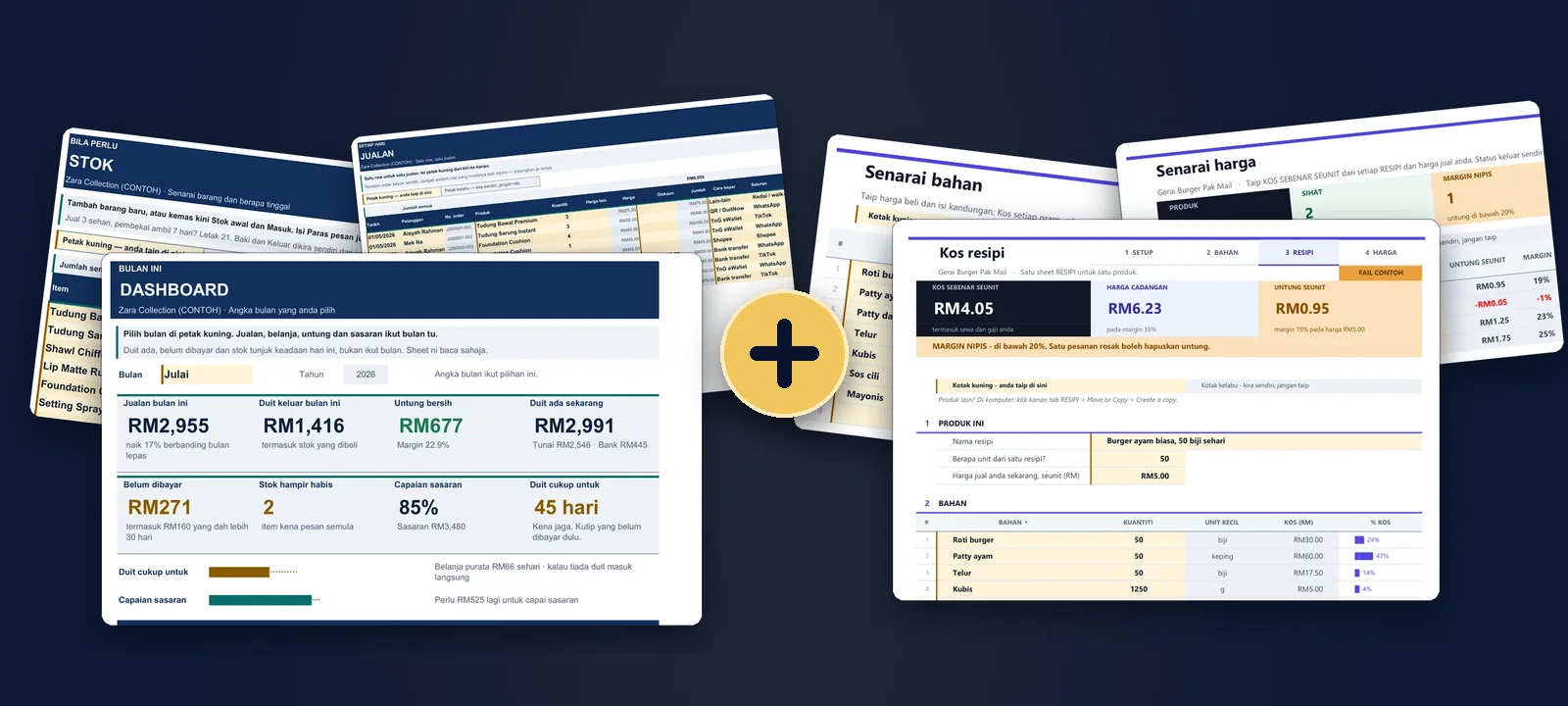
Combo · 2 Excel files
Take both files together
For RM27 more you get Small Business Control Pack as well.
Work out the real cost of one unit and its selling price, then record your sales and costs to see your profit. Two Excel files, one payment.
OnlyRM49RM61Save RM12
Bought apart: RM39 + RM22 = RM61.
Buy the combo - RM49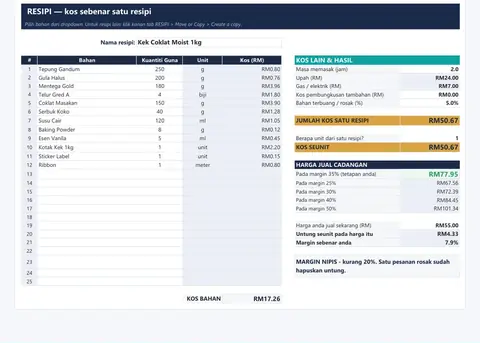
Read it all?
Recipe Cost & Selling Price
You sell a burger at RM5. How much do you make on each one?
Pay by FPX. The file arrives as soon as the bank confirms payment.
Ask first